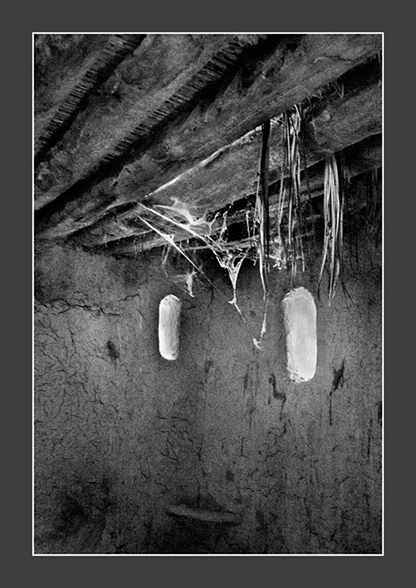
This is very nice. Last year I spent a lot of time documenting an archaeology project in an old building that a lot of holes in the roof. The spots of sunlight on the floor and walls were a plague in that context. But here they are great, though I can’t tell if the one to the left is a window opening (rather think it is) but both could be coming through what looks like a very leaky roof.
I think it is nearly impossible to get that kind of exposure right – maybe a very long exposure and dodging out the window with a little rectangle on a stick or something tricky like that….
Ha – the problem there is that the highlights get blocked and go almost black on the negative. Neither print nor scan will recover those. What I did in this case was meter both high and low then average the reading and hope 🙂
Then use a card with three small holes for the highlights after flashing the paper (giving it a slight diffused exposure without the negative) but then I had problems with the scan. Cannot win sometimes……
David.
P.S
Re-reading your comment: yes at the printing stage you are right, I could have done it that way, but it was easier trying to get the negative right first.
If I had used the D200 I would have still done the same but then still have similar problems in P/Shop.
Well, I was making a smart-ass comment about the trouble one could go to get the negative right. I have never even tried the relatively simple version for long bright sky exposures and moving a saw tooth edged black card to lower the upper exposures. The idea of doing that kind of thing more precisely seems a bit of a joke though I am sure some have tried it. And, I assumed you probably considered similar in the darkroom where it is more feasible, though not something I ever did very successfully in the those far off days. Interesting option that I never thought of to get the main part right and then work just on the holes.
Anyway, it worked out well and looks good.
Thanks Eldin,
I nearly deleted it though; as it looks good on my calibrated monitor and prints well but…..when I saw it on two other monitors – brighter than I expected (I tagged it sRGB) so not sure what the problem is. Maybe just me as I still get a bit frustrated with digital representations as apposed to prints.
As an aside – I hope the New Year has started out well for you.

 David A Lockwood
This is very nice. Last year I spent a lot of time documenting an archaeology project in an old building that a lot of holes in the roof. The spots of sunlight on the floor and walls were a plague in that context. But here they are great, though I can’t tell if the one to the left is a window opening (rather think it is) but both could be coming through what looks like a very leaky roof.
Thanks and yes the left is a window and trying to get the exposure right was not without difficulty …..!
David.
I think it is nearly impossible to get that kind of exposure right – maybe a very long exposure and dodging out the window with a little rectangle on a stick or something tricky like that….
Ha – the problem there is that the highlights get blocked and go almost black on the negative. Neither print nor scan will recover those. What I did in this case was meter both high and low then average the reading and hope 🙂
Then use a card with three small holes for the highlights after flashing the paper (giving it a slight diffused exposure without the negative) but then I had problems with the scan. Cannot win sometimes……
David.
P.S
Re-reading your comment: yes at the printing stage you are right, I could have done it that way, but it was easier trying to get the negative right first.
If I had used the D200 I would have still done the same but then still have similar problems in P/Shop.
Well, I was making a smart-ass comment about the trouble one could go to get the negative right. I have never even tried the relatively simple version for long bright sky exposures and moving a saw tooth edged black card to lower the upper exposures. The idea of doing that kind of thing more precisely seems a bit of a joke though I am sure some have tried it. And, I assumed you probably considered similar in the darkroom where it is more feasible, though not something I ever did very successfully in the those far off days. Interesting option that I never thought of to get the main part right and then work just on the holes.
Anyway, it worked out well and looks good.
Very effective David.
Thanks Louis.
David.
Nice!
Thanks Eldin,
I nearly deleted it though; as it looks good on my calibrated monitor and prints well but…..when I saw it on two other monitors – brighter than I expected (I tagged it sRGB) so not sure what the problem is. Maybe just me as I still get a bit frustrated with digital representations as apposed to prints.
As an aside – I hope the New Year has started out well for you.
David.